
Business Listing Management: A Kansas City Owner's Guide
Learn how to manage your business listings: claim, verify and fix your details on Google, Apple, Bing and Yelp, and keep them accurate in Kansas City.

Business listing management means keeping your name, address, phone number, hours and other basics correct everywhere customers look for you: Google, Apple Maps, Bing, Yelp, Facebook and local directories. You claim each profile, verify that you own it, fill it in completely, remove duplicates and check it on a schedule. This guide walks a Kansas City owner through that work, from a first afternoon of setup to a light monthly routine.
FindlocalkcHelp Kansas City Customers Find YouAdd your business to FindLocalKC’s directory, where local residents can browse businesses by city and category.Explore local listingsKey Takeaways
- Listing management (some people say business profile management) is one habit: one correct set of facts, copied exactly onto every platform, then checked regularly.
- Start with the profiles that matter most: Google, Apple Maps, Bing and Facebook, plus a local directory where Kansas City customers browse.
- Claim before you create. Most businesses already have a listing, and a second one causes duplicates.
- Photos and review replies are not extras. They are the part of your listing customers actually read.
- A free listing is enough to start. Paid placement makes sense only after your basics are clean.
Table of Contents
- What listing management actually covers
- Why accurate listings matter for a Kansas City business
- Step 1: Build your master record
- Step 2: Search before you create
- Step 3: Claim and verify the platforms that matter
- Step 4: Make each profile complete
- Step 5: Manage photos and reviews
- Step 6: Fix duplicates and wrong details
- A light schedule you will keep
- Where a Kansas City directory listing fits
- Our view: start free, fix the basics, then pay for placement
- FAQ
- Sources
What listing management actually covers
The terms overlap, and that is fine. BrightLocal describes listing management as creating, updating and optimizing your company’s information across directories, maps, search engines and social media so that it stays consistent. Semrush frames it around name, address and phone number (often shortened to NAP), and notes that listings can also carry hours, payment methods, images and videos.
“Business profile management” usually points at the same job from the customer’s side. Google, for example, says a Business Profile is the presence you control on Search and Maps: you can add hours and photos, manage reviews and updates, and see insights like searches, calls and bookings.
In practice the work breaks into five parts:
- Setting up your business data once, in a master record.
- Claiming and verifying each profile.
- Completing each profile with photos, categories and descriptions.
- Finding and removing duplicates and wrong details.
- Monitoring, then answering reviews.
Software can automate some of this, and a large chain with dozens of locations may want it. A single-location plumber in Overland Park or a salon in Liberty can do all five by hand in a few hours.
Why accurate listings matter for a Kansas City business
Customers punish errors. In BrightLocal’s 2023 Local Business Discovery & Trust Report, 62% of consumers said they would avoid a business after finding incorrect information online. A wrong phone number or an old address costs you the call before you ever hear about it.
Accuracy also feeds visibility. Google says complete and accurate information makes a business more likely to appear in local results, and that local ranking rests on relevance, distance and prominence, which includes the number and quality of reviews.
The Kansas City metro adds its own wrinkles:
- Two states, one city name. Kansas City, MO and Kansas City, KS are different places, and North Kansas City is a third. A listing that says only “Kansas City” with the wrong state or ZIP sends people to the wrong side of the state line.
- Suburbs that sound alike. Overland Park, Leawood, Liberty, Parkville, Independence and Gladstone each have their own searches. Customers search “near me” and by suburb name.
- Service areas. Many home service companies drive across the metro. They should set a service area rather than show a home address they do not want visitors at.
The point is simple: the more places that show the same correct facts, the less a customer has to guess.
Step 1: Build your master record
Before touching any platform, write down the exact version of your business facts in one document. Groupon’s merchant guide suggests a master document with exact NAP details so that entries are identical everywhere. Include:
Field What to decide Business name Exactly as on your sign and legal paperwork. No added keywords. Address One format: “Suite” or “Ste”, “Street” or “St”. Pick one and keep it. Phone One main local number, written the same way each time. Website One URL, with or without “www”, and HTTPS. Hours Regular hours plus a plan for holidays. Categories A primary category and a few secondary ones. Description A short and a longer version, written once. Photos Logo, storefront, interior, team, work samples.Keep this document where whoever answers the phone can find it. When you move, add a number or change your hours, you edit the record first and then push the change out.
Step 2: Search before you create
Most established businesses already have listings, some made by you years ago, some auto-generated from public data. Search your name, old addresses and old phone numbers on Google, Yelp and Bing Places before creating anything. The Groupon guide recommends exactly that sweep and then claiming what you find, rather than starting fresh.
Creating a new profile when one exists is the most common cause of duplicates, and duplicates split your reviews and confuse customers. If you find a listing for your business, claim it. If it is wrong and you cannot claim it, you can report it, as covered below.
Step 3: Claim and verify the platforms that matter
BrightLocal recommends focusing first on Google Maps, Apple Maps, Bing and Facebook. Add Yelp if your category is one customers review there, such as restaurants and many home services. Then add the local directories your Kansas City customers actually use.
Google Business Profile
Google says that creating and listing a business is free for U.S. businesses. The workflow is to create or claim the profile, add essential information and photos, then keep it fresh with updates, offers and review responses.
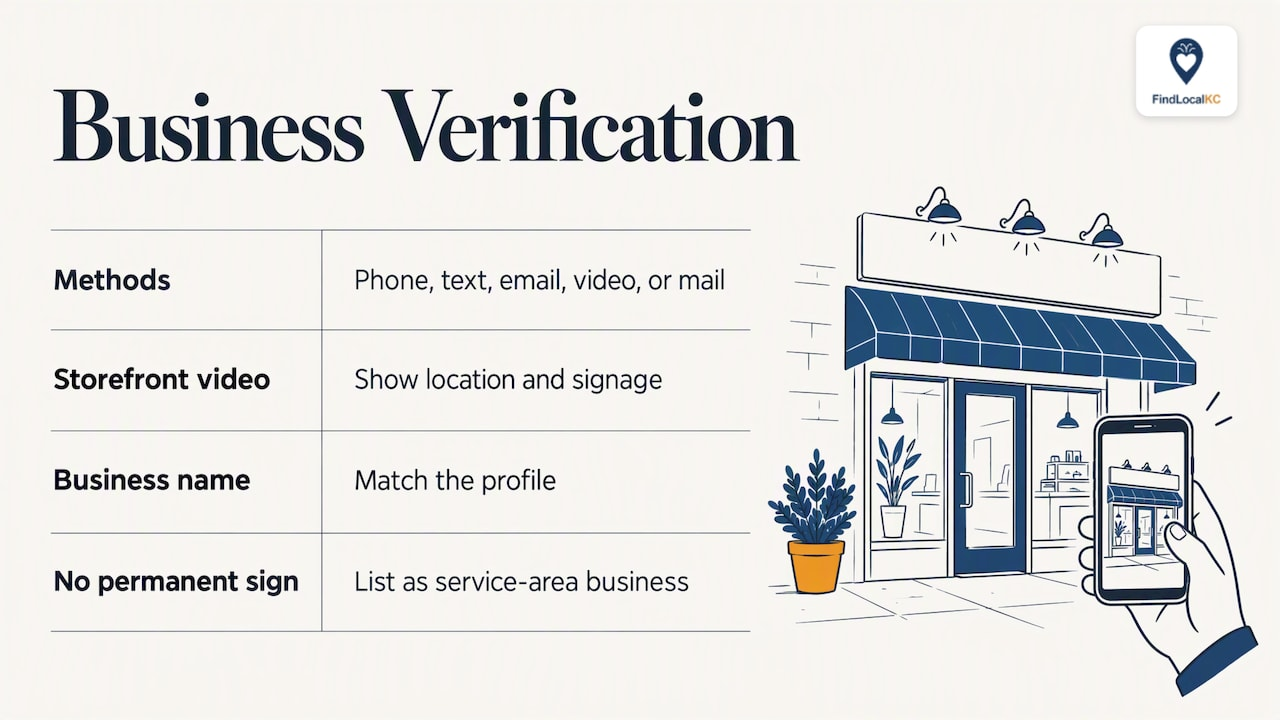
Verification is what proves the business is yours. Google’s methods vary by business and location, and American Express notes they can include phone, text, email, video or mail. If you are offered video, Google’s video verification page says a storefront business must show its location and signage, and the business name in the video must match the profile. A business with no permanent signage should list itself as a service-area business instead of a storefront.
This matters for more than trust. Photos and review replies only work after you verify.
Apple Maps, Bing and Facebook
Each has its own free claim flow, and each wants the same master record. Do these in one sitting while the document is open. The goal is not clever optimization. It is that a customer on an iPhone, a Windows laptop or Facebook sees the same hours as a customer on Google.
Local directories
Broad platforms are only part of discovery. Semrush points out that customers use a variety of directories, not just Google. A metro-specific directory helps because it is built around the places you serve. FindLocalKC, for instance, organizes listings by city and category across both Kansas City, MO and KS, with free basic listings and a claim and verification process for owners. If you are not sure where to begin, our guide to free directory listings in Kansas City walks through the options.
Step 4: Make each profile complete
A claimed profile with only a name and phone number is a missed opportunity. Google’s own advice is that completeness helps you appear in local results, so fill in everything that applies:
- Categories. Choose the most specific primary category. “Roofing contractor” beats “contractor”.
- Services and products. List what you actually do, in plain words customers use.
- Description. Say what you do, who you serve and where. Skip the sales pitch.
- Attributes. Accessibility, payment methods, appointment links, kid-friendly features.
- Hours. Include special hours for holidays before they arrive, not after.
Step 5: Manage photos and reviews
This is where listings stop being a data-entry job and become a customer channel.
Photos
Google’s photo guidelines ask for JPG or PNG files between 10 KB and 5 MB, with a recommended size of 720 by 720 pixels and a minimum of 250 by 250. Photos should be in focus, well lit and free of heavy filters, so the image represents reality. Google also notes an exterior photo helps customers recognize your business when they arrive.
A practical set for a Kansas City business:
- Your logo.
- An exterior shot from the street, and one from the parking lot if parking is hard to find.
- The inside, with real customers or staff when they agree to it.
- Your work: finished kitchens, haircuts, plated dishes, repaired engines.
- Your team, so people know who will show up.
Reshoot when something changes. A remodel that does not appear in your photos makes your listing look abandoned.
Reviews
Google states that you must verify your business before you can reply to reviews, and that replies are checked against its content policies. A few habits work well:
- Reply to all of them, positive and negative, within a few days.
- Be specific. Mention the job or the dish rather than pasting the same thank-you.
- Handle complaints once, publicly, then move offline. State that you want to fix it and give a direct phone number or email.
- Never argue, and never offer incentives in exchange for a review.
- Ask at the right moment, right after a good job or visit, with a direct link or QR code.
For a deeper look, see our Kansas City guide to improving your online reputation.
Step 6: Fix duplicates and wrong details
Duplicates usually come from moves, rebrands, a changed phone number, or someone creating a listing without checking. The approach is consistent:
- Decide which listing is the real one. Keep the profile that holds the reviews and history.
- If you own the duplicate, remove it. If you do not, report it. One guide on name changes recommends updating the existing profile and reporting an unowned duplicate through “Suggest an edit” on Google Maps, then updating Apple, Bing, Yelp and Facebook.
- Update everywhere. A fix on Google that leaves an old address on Bing just moves the problem.
- Do not delete wildly. Removing a listing that holds your reviews loses them.
If you changed your name or legal structure (a DBA, for example), edit the existing profile rather than creating a new one. And if the change involves a physical move, update your sign, website footer, social bios and directory entries in the same week.
A light schedule you will keep
The common advice is to check on a regular rhythm. The exact frequency is a judgment call, so here is a sensible routine for a small local business, not a rule from any platform:
When What to do Weekly Read and reply to new reviews. Scan your inbox for suggested edits. Monthly Search your business name and phone number. Look for new duplicates or wrong hours. Add a fresh photo. Quarterly Compare every profile to your master record. Review your categories and descriptions. Any change Update the master record first, then every profile. Do holiday hours a week or two early.Tools that flag NAP mismatches can help here, and Local Data Exchange suggests monitoring mismatches with a listing dashboard. If you do not use software, a spreadsheet with one row per platform and a “last checked” column does the job.
Track results in the profile insights Google provides: searches, calls, reviews and bookings. Watch the trend. If calls rise after you add photos and fix your hours, you know the work is paying.
Where a Kansas City directory listing fits
Listing management is not only a chore. Each correct listing is another door for a nearby customer. A metro directory adds something broad platforms do not: customers browsing by city and category, such as home services in Overland Park or restaurants in Liberty, rather than typing one exact name.
On FindLocalKC, basic listings are free, and owners can claim and verify their business. Two paid options exist for owners who want more visibility: Featured at $29 per month and Premium Spotlight at $79 per month, listed on our pricing page. Listings are sorted by premium placement, so upgraded businesses appear first within their city and category. Paid plans add lead contact forms, reporting and priority placement. You can see how the process runs on our How It Works page.
Not sure where your own listings stand? Our free website and SEO audit is a good first check before you spend anything.
For owners who want to go further than listings, our local SEO playbook for Kansas City covers the website side. If you would rather hand off marketing work, you can also browse advertising agencies in Kansas City, MO. Readers in the northern suburbs can see who is already listed in Liberty.
Our view: start free, fix the basics, then pay for placement
We see two mistakes from local owners. The first is buying visibility before the basics are right. A premium spot with an old phone number sends paying traffic to a dead end. The second is treating listings as a one-time task. Hours change, staff change, a competitor opens across the street, and a listing that was perfect in January is wrong by summer.
Our advice is a sequence. Write the master record. Claim and verify the big four platforms and your local directory. Add real photos. Answer reviews like a neighbor would. Check it monthly. Only then ask whether Featured or Premium Spotlight placement is worth it for your category and your competition. A busy category like restaurants or home services in a crowded suburb may justify it sooner than a niche trade with few local rivals.
We built FindLocalKC because Kansas City residents want to find real, verified local businesses, and owners want to be found without a big ad budget. A clean listing helps both.
— Zach
FAQ
How much does business listing management cost?
Doing it yourself costs time rather than money. Google says creating a Business Profile is free for U.S. businesses, and many directories, including FindLocalKC, offer free basic listings. Paid software and paid placement are optional extras.
What is the difference between listing management and business profile management?
They describe nearly the same work. Listing management usually means keeping your details consistent across many directories. Profile management often focuses on one platform, such as your Google Business Profile, including photos, posts and reviews.
How long does verification take?
It depends on the method Google offers your business, which can include phone, text, email, video or mail. Some are quick and mailed codes take longer. Start verification early, because photos and review replies stay locked until it finishes.
What should I do if I find a duplicate listing I did not create?
Search for it, claim it if you can, and otherwise report it with “Suggest an edit” on Google Maps or the support tool on the platform in question. Keep the listing that holds your reviews, and update your details on the others.
Do I need to be on every directory?
No. Start with Google, Apple Maps, Bing and Facebook, add Yelp if customers review your category there, then choose local directories where people in your area browse. Accuracy on a few profiles beats neglect across dozens.
Sources
- Get Listed on Google - Google Business Profile
- Tips to improve your local ranking on Google
- Manage your Business Profile photos & videos
- Manage customer reviews - Google Business Profile Help
- Verify your business with a video recording
- How to Manage Business Listings Properly - BrightLocal
- Local Business Discovery & Trust Report 2023 - BrightLocal
- What is Listing Management? - Semrush
- Local business listings and directories guide - Groupon
- How to Get Your Small Business Verified Online - American Express
- Duplicate Business Name After a DBA Update: Fixes
- How to Safely Remove Duplicate Listings Without Hurting SEO