
Local SEO for Small Business: A Kansas City Playbook
A practical local SEO plan for Kansas City small businesses: Google Business Profile, reviews, citations, local pages and a realistic weekly routine.

Local SEO is the work of making sure people near you find your business when they search for what you sell. For a small business, it comes down to five things: a complete and verified Google Business Profile, consistent business details everywhere online, a steady flow of fresh reviews, a website with one clear page per service and area, and a few trusted local listings. None of it needs a big budget. It needs accuracy and a routine.
This guide is written for owners in the Kansas City metro, on both sides of the state line, from Overland Park to Independence. The principles apply anywhere, but the examples are local.
FindlocalkcHelp Kansas City Find Your BusinessAdd your business to FindLocalKC’s directory, where Kansas City residents can browse local listings across the metro.Explore the directoryTL;DR
- Claim and verify your Google Business Profile first. It is the single most influential piece of your local presence, and it is free.
- Keep your name, address and phone number identical on your website, your profile and every directory.
- Ask for reviews at the moment of service, and answer every one, good or bad.
- Build one page per core service and per city you serve, rather than one page that tries to cover everything.
- Add a few high-quality local listings, such as a free Kansas City directory listing, and measure calls and direction requests, not just rankings.
Table of Contents
- What local SEO actually is
- How Google decides who shows up
- Step 1: Own your Google Business Profile
- Step 2: Keep your details identical everywhere
- Step 3: Make reviews a habit, not a campaign
- Step 4: Build a website that matches how people search
- Step 5: Use local listings that carry weight
- Perspective: what we see running a Kansas City directory
- Where a Kansas City directory listing fits
- A realistic weekly routine
- How to measure what is working
- Common mistakes to avoid
- FAQ
- Sources
What local SEO actually is
When someone searches “plumber near me” or “Italian restaurant” on a phone, Google shows a map and a short list of nearby businesses before the ordinary web results. Local SEO is everything you do to earn a place in that list and to turn the click, call or visit into a customer.
It differs from general SEO in one way that matters: location is part of the question. A national blog post can rank from anywhere. A local result depends on where the searcher is standing and where your business is.
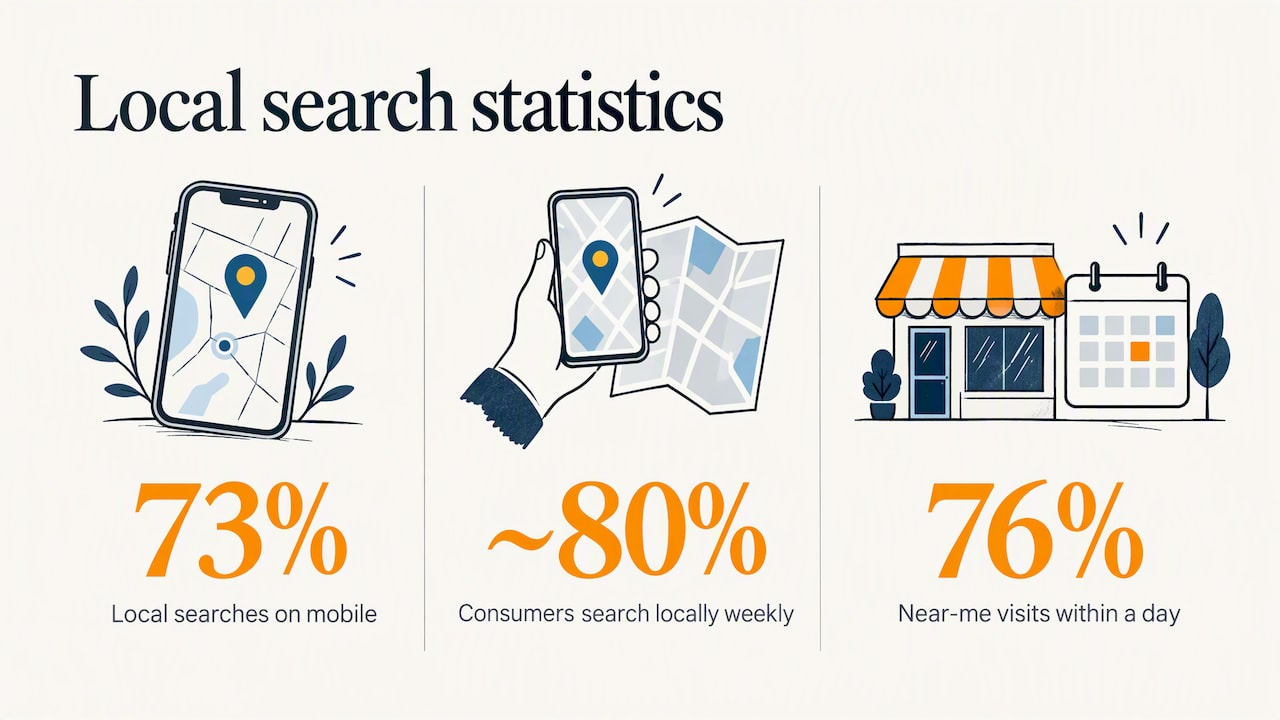
The stakes are practical. One 2026 compilation of local search statistics reports that 73% of local searches come from mobile devices and roughly 80% of US consumers search locally every week. Another source puts the in-person follow-through at 76% of “near me” searchers visiting a business within a day. Treat these as directional, since both are secondary compilations, but the pattern is consistent: local searchers are close to buying.
How Google decides who shows up
Google says local results are based mainly on three factors: relevance, distance and prominence. In its own words on the Business Profile help page about local ranking, relevance is how well a profile matches what someone is searching for, distance is how far the business is from the searcher, and prominence is how well known the business is.
You cannot change distance. A bakery in Waldo will not outrank one in Waldo for a searcher standing in Waldo just because it wrote better copy. But you control the other two:
- Relevance comes from choosing accurate categories, writing a clear description, listing your services and keeping hours and details complete.
- Prominence comes from reviews, mentions across the web, links, and a consistent identity in many places.
Google also notes that businesses with complete and accurate information are more likely to appear in local results. That is the least glamorous advice in SEO and the most reliable.
Step 1: Own your Google Business Profile
Many owners put their website first and their Google profile second. For local discovery, it is usually the other way round. One industry summary cites BrightLocal research that an average profile receives about 59 customer actions a month, meaning calls, website clicks and direction requests. The same source estimates that profile signals carry roughly a third of local pack ranking weight, with the primary category the most important single factor. That is an expert estimate, not a number Google publishes, so use it as a priority guide rather than a formula.
Claim and verify it
Search for your business name and city while signed into the Google account you want to use. If a profile exists, claim it. If not, create one. Google explains that verifying gives you ownership and control of your information, and that the verification method is chosen by Google, so you may be offered a phone call, text, email, video or a postcard, depending on your situation.
Do not skip this. An unverified profile cannot be edited reliably, and anyone can suggest changes to it.
Fill in every field
Use this checklist:
- Primary category: pick the most specific one that describes your core business, not a broad one.
- Secondary categories: add the other things you genuinely do.
- Hours: include holiday hours. Wrong hours cost you the customer and the review.
- Service areas: if you travel to customers, list the cities you actually serve, such as Gladstone, Liberty or Parkville.
- Services and products: list them with short descriptions.
- Photos: real ones of your storefront, team and work. Add new ones monthly.
- Description: plain language, what you do, who for, where.
Step 2: Keep your details identical everywhere
Search engines cross-check. If your profile says “Suite 200”, your website says “Ste. 200” and an old directory shows the address from three years ago, you create doubt about which is right.
Pick one version of your business name, address and phone number, and copy it exactly. Then audit the places where it appears:
- Your website footer and contact page
- Your Google Business Profile
- Social profiles
- Local directories and chamber of commerce pages
- Industry-specific listings (for example, healthcare or home-services sites)
Do this once, thoroughly, and again whenever you move or change a phone number. Wrong listings that you did not create are the usual culprit, so search your phone number in quotes and see what turns up.
Step 3: Make reviews a habit, not a campaign
Reviews affect both ranking and whether a searcher chooses you. They are also where small businesses lose ground quietly.
Ask at the right moment
The best time is right after a good experience. One review study advises collecting email or SMS contact details at the time of service so you can ask later, and reports that 83% of customers are at least somewhat responsive to review requests. A simple text with a direct link beats a sign by the register.
Do not pay for reviews or offer discounts in exchange for them. Consumers have grown skeptical: the same statistics roundup says trust in online reviews fell from 79% in 2020 to 42% in 2025. Reviews that read as real, with specifics and an occasional complaint, are worth more than a wall of five-star praise.
Answer every one
Replying is part of the product now. A review-management analysis reports that 81% of consumers see active responses as a sign of good service, and 65% are more likely to choose a business that engages. For a negative review, thank the person, acknowledge the problem without arguing, and offer to fix it offline.
Keep them recent
Ranking is only half of it. One source argues that a listing with stale reviews can lose clicks to a slightly lower-ranked competitor showing feedback from the last three months. Ten reviews a month for a busy shop is a better rhythm than fifty in January and none until June.
A technical trap with review stars
If you want star ratings to appear beside your own website pages in search results, be careful. Google’s documentation on review snippets says that reviews a business writes or controls about itself do not qualify. Do not paste testimonials into markup and expect stars. Your Google profile reviews already do that job where it counts.
Step 4: Build a website that matches how people search
Your website supports the profile. It should confirm everything the profile says and give Google and visitors a reason to trust you.
One page per service, one page per area
A single “Services” page listing eight services is hard to rank for any of them. Give each core service its own page with real detail: what is included, typical timelines, photos, and answers to common questions. If you serve several cities, write a page for each that is about that city, with local landmarks, job examples and testimonials, rather than the same text with the city name swapped. Duplicate pages with only the name changed add nothing.
One small-business SEO summary makes the same point: one strong page per core service beats many thin pages.
Mark up your business
Structured data tells Google your address, hours and phone number in a format it reads directly. Google’s guide to local business structured data explains the properties and how they can feed the knowledge panel. Many website builders and plugins add it for you. Check that the details match your profile exactly.
Make it work on a phone
With nearly three in four local searches on mobile, a slow page or a tiny tap target costs you calls. Put your phone number at the top as a tap-to-call link, your address one tap from a map, and your hours where nobody has to hunt.
Step 5: Use local listings that carry weight
Listings and citations are mentions of your business name, address and phone number on other sites. They help confirm that you exist, where you are and what you do. They are not a magic ranking switch, so quality beats quantity.
For a Kansas City business, the useful types are:
- Major platforms: the big map and review platforms customers already use.
- Industry directories: where people in your trade or category look.
- Chamber and neighborhood organizations: a local mention carries relevance that a generic one does not.
- Local metro directories: sites focused on one region, where every listing is a local business and every visitor is a local searcher.
Perspective: what we see running a Kansas City directory
We run FindLocalKC, a directory of Kansas City metro businesses covering Kansas City, Missouri and Kansas, with over 1,000 listings across restaurants, home services, healthcare, fitness, beauty, auto, pets and childcare. That vantage point shows us the same mistakes over and over.
The most common is a listing that is technically there but unclaimed: old hours, no photos, no way for a customer to reach the owner. The business is visible and still loses the customer. Claiming and verifying takes minutes, and it is the difference between a listing that works for you and one that merely exists.
The second is treating every channel as a separate job. A business with a tidy Google profile, a matching website and a verified local listing sends consistent signals to people and to search engines. The one with three different phone numbers sends confusion.
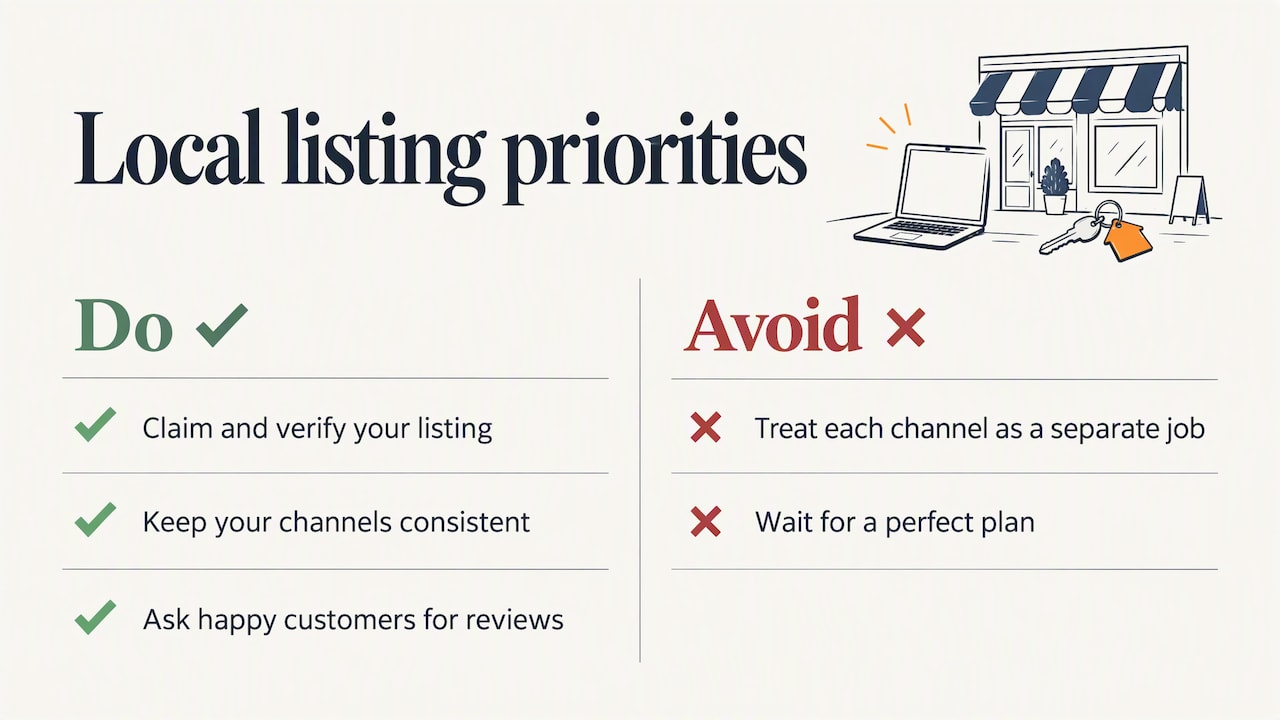
The third is waiting for a perfect plan. Small business owners do not need an agency retainer to get the basics right. They need an afternoon to claim profiles and a habit of asking happy customers for a review. We built free listings and free claim and verification for exactly this reason: the first step should not cost anything.
Our reviews on the platform come first-party, from people who used the directory, and city and category pages group businesses the way residents actually look for them, by place and by need. If you are choosing where to put your effort, put the first hours into your own profile and website, then into a handful of local places where your customers already look.
— Zach
Where a Kansas City directory listing fits
A local directory is a supporting piece, not a replacement for your own profile and site. It gives you one more consistent, verified mention, and a page that local residents can browse by city or category.
On FindLocalKC you can start with a free listing. Paid options are there if you want more visibility:
Plan Price Best for Free No published price Basic inclusion and claiming your listing Featured 29 $ per month Businesses that want priority placement Premium Spotlight 79 $ per month Businesses that want the strongest visibilityListings can carry verified and claimed status, reviews, a lead contact form, a website link and photo galleries, and we offer a free website and SEO audit for businesses. See the plans and what each includes, or read how the directory works before you decide. If you serve a specific city, check how your neighbors appear on pages like Lee’s Summit, Liberty or Gladstone.
A realistic weekly routine
Local SEO rewards consistency more than intensity. This routine takes about an hour a week once the setup is done.
- Monday: check new reviews and reply to each one.
- Wednesday: upload two or three new photos to your profile and post an update, such as a seasonal offer or a completed job.
- Friday: send review requests to the week’s customers while the experience is fresh.
- Monthly: check hours, services and your phone number across your main listings. Add or refresh one service or city page on your site.
- Quarterly: review your numbers, meaning calls, direction requests and website visits from your profile, and see which actions rose or fell.
How to measure what is working
Rankings move around by location and device, so a single position number tells you little. Better indicators:
- Calls and direction requests from your Google profile, which are visible in its performance data.
- Form submissions and calls from your website, tracked by source.
- Review count and recency, meaning how many came in the last 90 days.
- “How did you hear about us?” asked at the counter or on the phone. It is unglamorous and tells you things analytics cannot.
If calls and direction requests rise over a few months while the work stays steady, the plan is working.
Common mistakes to avoid
- Using a keyword-stuffed business name. Use your real name as it appears on your signage.
- Listing a virtual office or a P.O. box as a storefront. It risks suspension and confuses customers.
- Ignoring negative reviews. The reply is for the next reader as much as the reviewer.
- Letting old listings linger. After a move, correct or remove the old addresses.
- Buying bulk citations or fake reviews. They add risk, not prominence.
- Doing nothing because you cannot do everything. A verified profile and ten recent reviews beat a half-finished ten-point plan.
FAQ
How much does local SEO cost for a small business?
The core work, claiming your Google Business Profile, fixing your details and asking for reviews, costs only your time. Paid help or paid placements are optional, and prices vary widely. On our own platform, a listing is free and paid placement is 29 $ per month for Featured or 79 $ per month for Premium Spotlight.
How long does it take to see results?
Some changes show up quickly, such as a corrected phone number or new photos. Ranking gains from reviews and stronger pages usually build over several months. Track calls and direction requests rather than checking your position daily.
Do I need a website if I have a Google Business Profile?
Yes, in most cases. The profile gets you found, and the website confirms your services, answers questions and gives you pages to rank for specific searches. If you do not yet have one, a profile and a verified directory listing are a reasonable start while you build it.
Is a local directory listing still worth it?
A listing in a relevant, well-kept local directory adds a consistent mention and a page residents can browse by city or category. It works best alongside your own profile and website, not instead of them. Claim it, check that the details match, and keep it current.
Sources
- Tips to improve your local ranking on Google, Google Business Profile Help
- Verify your business on Google, Google Business Profile Help
- Review snippet structured data, Google Search Central
- Local business structured data, Google Search Central
- Local SEO and Google Business Profile Statistics 2026
- Small Business SEO Statistics 2026
- Surprising Review Stats To Feed Your Local Strategy, Search Engine Journal
- A Data-based Exit from the Review Neglect Money Pit, GatherUp